Imagine that we have a website that hosts blog posts and enables users to vote for the blog posts that they like. We would like more-popular posts to appear higher in the results list, but still have the full-text score as the main relevance driver. We can do this easily by storing the number of votes with each blog post:
사용자들이 자기가 좋아하는 블로그 게시물에 투표할 수 있는 기능이 있는 website를 가정해 보자. 결과 목록에서 더 높게 나타나는 더 인기 있는 게시물을 좋아하겠지만, 여전히 full-text score를 relevance score로 가져야 한다. 각 블로그 게시물의 투표 수를 저장하면, 간단하게 이것을 할 수 있다.
PUT /blogposts/post/1
{
  "title":   "About popularity",
  "content": "In this post we will talk about...",
  "votes":   6
}
At search time, we can use the function_score query with the field_value_factor function to combine the number of votes with the full-text relevance score:
검색 시에, 투표 수와 full-text relevance score를 조합하기 위하여, field_value_factor function으로 function_score query를 사용할 수 있다.
GET /blogposts/post/_search { "query": { "function_score": {"query": {
"multi_match": { "query": "popularity", "fields": [ "title", "content" ] } }, "field_value_factor": {
"field": "votes"
} } } }
|
|
| main query가 먼저 실행된다. |
|
|
| 모든 document는 |
In the preceding example, the final _score for each document has been altered as follows:
위의 예에서, 각 document에 대한 최종 _score 는 아래처럼 변경된다.
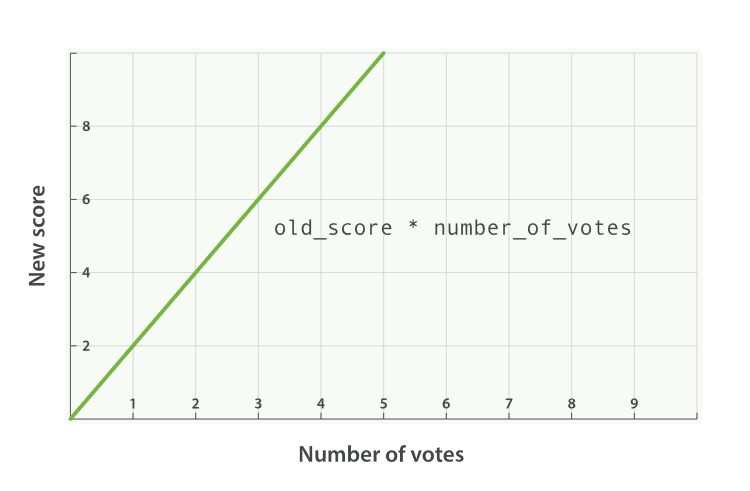
new_score = old_score * number_of_votes
This will not give us great results. The full-text _score range usually falls somewhere between 0 and 10. As can be seen in Figure 29, “원래의 _score 가 2.0 인 경우 인기의 선 그래프”, a blog post with 10 votes will completely swamp the effect of the full-text score, and a blog post with 0 votes will reset the score to zero.
위에서 좋은 결과가 나오지는 않을 것이다. full-text _score 의 범위는 일반적으로 0 ~ 10 사이의 어디쯤일 것이다. Figure 29, “원래의 _score 가 2.0 인 경우 인기의 선 그래프”에서 볼 수 있듯이, 투표수가 10인 블로그 게시물은 full-text score의 효과를 완전히 뒤덮을 것이고, 투표수가 0인 게시물은 score가 0이 될 것이다.
modifieredit
A better way to incorporate popularity is to smooth out the votes value with some modifier. In other words, we want the first few votes to count a lot, but for each subsequent vote to count less. The difference between 0 votes and 1 vote should be much bigger than the difference between 10 votes and 11 votes.
인기를 통합하는 더 나은 방법은, 어떤 modifier 로 votes 값을 일정부분 제거하는 것이다. 즉, 처음 몇 번은 votes를 많이 세고, 그 뒤의 votes는 덜 세는 것이다. votes 0과 1의 차이는 10과 11의 차이보다 훨씬 더 커야 한다.
A typical modifier for this use case is log1p, which changes the formula to the following:
이 예를 위한 대표적인 modifier 는 log1p 이다. 따라서 수식은 아래처럼 변경된다.
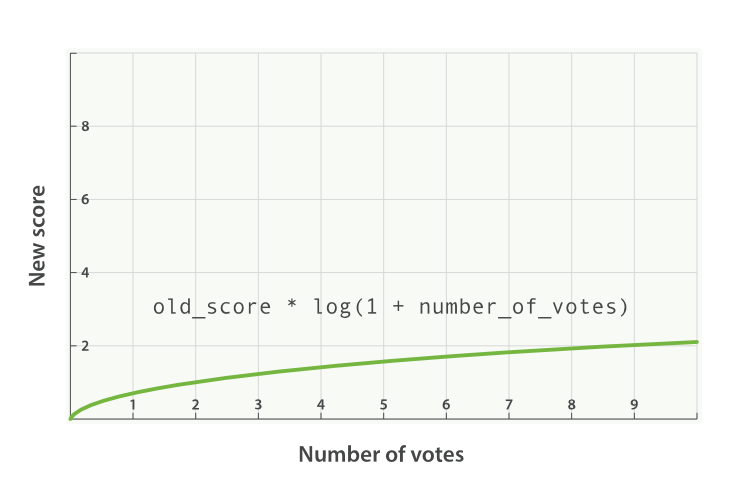
new_score = old_score * log(1 + number_of_votes)
The log function smooths out the effect of the votes field to provide a curve like the one in Figure 30, “원래의 _score 가 2.0 인 경우 인기의 log 그래프”.
log function은, Figure 30, “원래의 _score 가 2.0 인 경우 인기의 log 그래프”와 같은 곡선을 나타내기 위해, votes field의 값을 일정 부분 제거한다.
The request with the modifier parameter looks like the following:
modifier 매개변수를 이용한 request는 아래와 같다.
GET /blogposts/post/_search { "query": { "function_score": { "query": { "multi_match": { "query": "popularity", "fields": [ "title", "content" ] } }, "field_value_factor": { "field": "votes", "modifier": "log1p"
|
|
The available modifiers are none (the default), log, log1p, log2p, ln, ln1p, ln2p, square, sqrt, and reciprocal. You can read more about them in the field_value_factor documentation.
이용할 수 있는 modifier에는 none(기본), log, log1p, log2p, ln, ln1p, ln2p, square, sqrt 그리고 reciprocal 이 있다. 더 많은 정보를 위해 field_value_factor documentation를 참고하자.
factoredit
The strength of the popularity effect can be increased or decreased by multiplying the value in the votes field by some number, called the factor:
votes field에 있는 값에 어떤 숫자를 곱하여, 인기의 효과를 증가 또는 감소시킬 수 있는데, 이를 factor 라 한다.
GET /blogposts/post/_search { "query": { "function_score": { "query": { "multi_match": { "query": "popularity", "fields": [ "title", "content" ] } }, "field_value_factor": { "field": "votes", "modifier": "log1p", "factor": 2
| 인기의 효과를 두 배로 한다. |
Adding in a factor changes the formula to this:
factor 를 추가하면, 수식은 아래와 같이 변경된다.
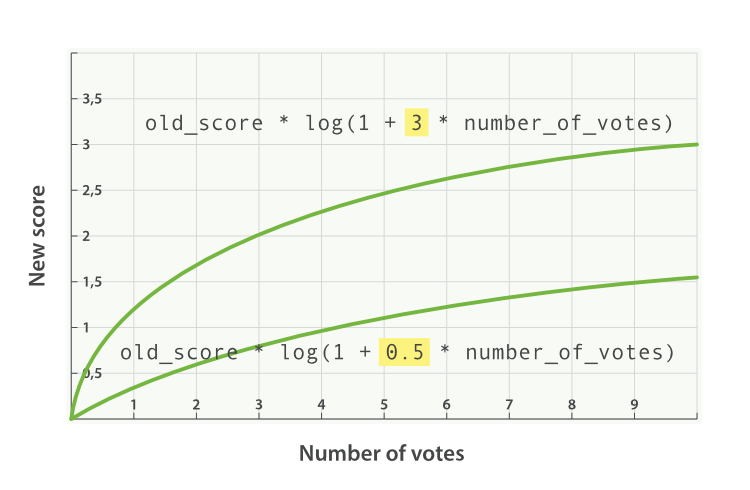
new_score = old_score * log(1 + factor * number_of_votes)
A factor greater than 1 increases the effect, and a factor less than 1 decreases the effect, as shown in Figure 31, “여러 가지 factor에 따른 인기의 log 그래프”.
Figure 31, “여러 가지 factor에 따른 인기의 log 그래프”에서 알 수 있듯이, factor 가 1 보다 크면 효과는 증가하고, 1 보다 작으면 감소한다.
boost_modeedit
Perhaps multiplying the full-text score by the result of the field_value_factor function still has too large an effect. We can control how the result of a function is combined with the _score from the query by using the boost_mode parameter, which accepts the following values:
full-text score를 field_value_factor function의 결과와 곱하면, 효과가 너무 커질 수 있다. boost_mode매개변수를 사용하여, function의 결과가 query의 _score 와 조합되는 방법을 제어할 수 있다. 아래와 같은 값이 있다.
multiplyMultiply the
_scorewith the function result (default)_score를 function의 결과와 곱한다. (기본값)sumAdd the function result to the
_score_score에 function의 결과를 더한다.minThe lower of the
_scoreand the function result_score와 function의 결과 중 더 작은 값maxThe higher of the
_scoreand the function result_score와 function의 결과 중 더 큰 값replaceReplace the
_scorewith the function result_score를 function의 결과로 대체한다.
If, instead of multiplying, we add the function result to the _score, we can achieve a much smaller effect, especially if we use a low factor:
곱하는 대신에, function의 결과에 _score 를 더한다면, 특히나 낮은 factor 를 사용한다면, 훨씬 더 작은 효과를 만들 수 있다.
GET /blogposts/post/_search { "query": { "function_score": { "query": { "multi_match": { "query": "popularity", "fields": [ "title", "content" ] } }, "field_value_factor": { "field": "votes", "modifier": "log1p", "factor": 0.1 }, "boost_mode": "sum"
|
|
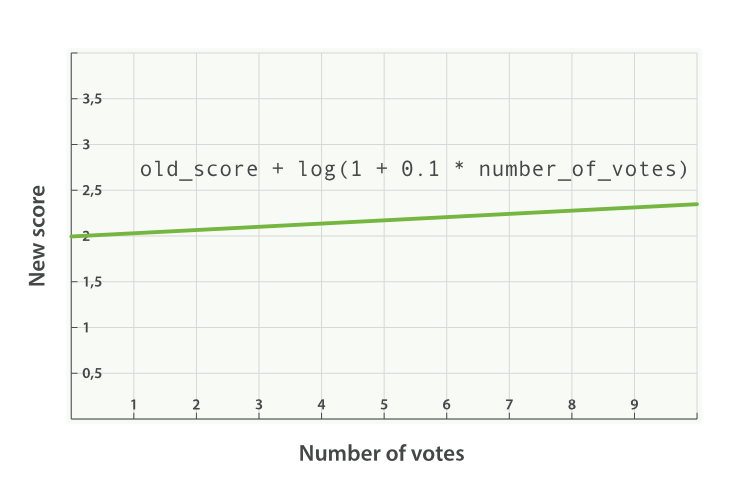
The formula for the preceding request now looks like this (see Figure 32, “sum 을 사용한 인기의 조합”):
이제, 위의 request에 대한 수식은 아래와 같다(Figure 32, “sum 을 사용한 인기의 조합”) 참조).
new_score = old_score + log(1 + 0.1 * number_of_votes)
max_boostedit
Finally, we can cap the maximum effect that the function can have by using the max_boostparameter:
마지막으로, max_boost 매개변수를 사용하여, function이 가질 수 있는 최대 효과를 제한할 수 있다.
GET /blogposts/post/_search { "query": { "function_score": { "query": { "multi_match": { "query": "popularity", "fields": [ "title", "content" ] } }, "field_value_factor": { "field": "votes", "modifier": "log1p", "factor": 0.1 }, "boost_mode": "sum", "max_boost": 1.5
|
|

The max_boost applies a limit to the result of the function only, not to the final _score.
max_boost 는, 최종적인 _score 가 아닌, function의 결과에 대한 제한에만 적용한다.
'2.X > 2. Search in Depth' 카테고리의 다른 글
| 2-6-06. Ignoring TF/IDF (0) | 2017.09.24 |
|---|---|
| 2-6-07. function_score Query (0) | 2017.09.24 |
| 2-6-09. Boosting Filtered Subsets (0) | 2017.09.24 |
| 2-6-10. Random Scoring (0) | 2017.09.24 |
| 2-6-11. The Closer, The Better (0) | 2017.09.24 |